Creating Posts - GenAI SEO Writer
Complete Tutorial Video
WordPress Integration
For WordPress websites, this app handles everything from title generation to publishing fully SEO-optimized articles with images! Click "Create New Post" to begin your content creation journey.
Step-by-Step Creation Process
Step 1: Selecting Your Site
Site Selection
Choose from your managed sites list:
- WordPress sites: Article will be automatically published
- Non-WordPress sites: Generate content for manual posting
| Site Type | Auto-Publishing | Image Upload | Telegram Integration |
|---|---|---|---|
| WordPress | Yes | Yes | Yes |
| Non-WordPress | Manual | Download Only | No |
Step 2: Article Title Selection
AI-Generated Titles
Our system generates 5 unique titles based on your site topics from the "Manage Sites" section.
Your Options: - Select from generated titles - Input your own custom title - Mix and match - use generated titles as inspiration
Step 3: Editing Your Article
Rich Text Editor
Use our comprehensive editor to customize your content:
- Edit text and formatting
- Add your own images
- Replace generated images
- Remove unwanted content
Embedding Videos
YouTube Video Embedding
Follow this process to embed YouTube videos:
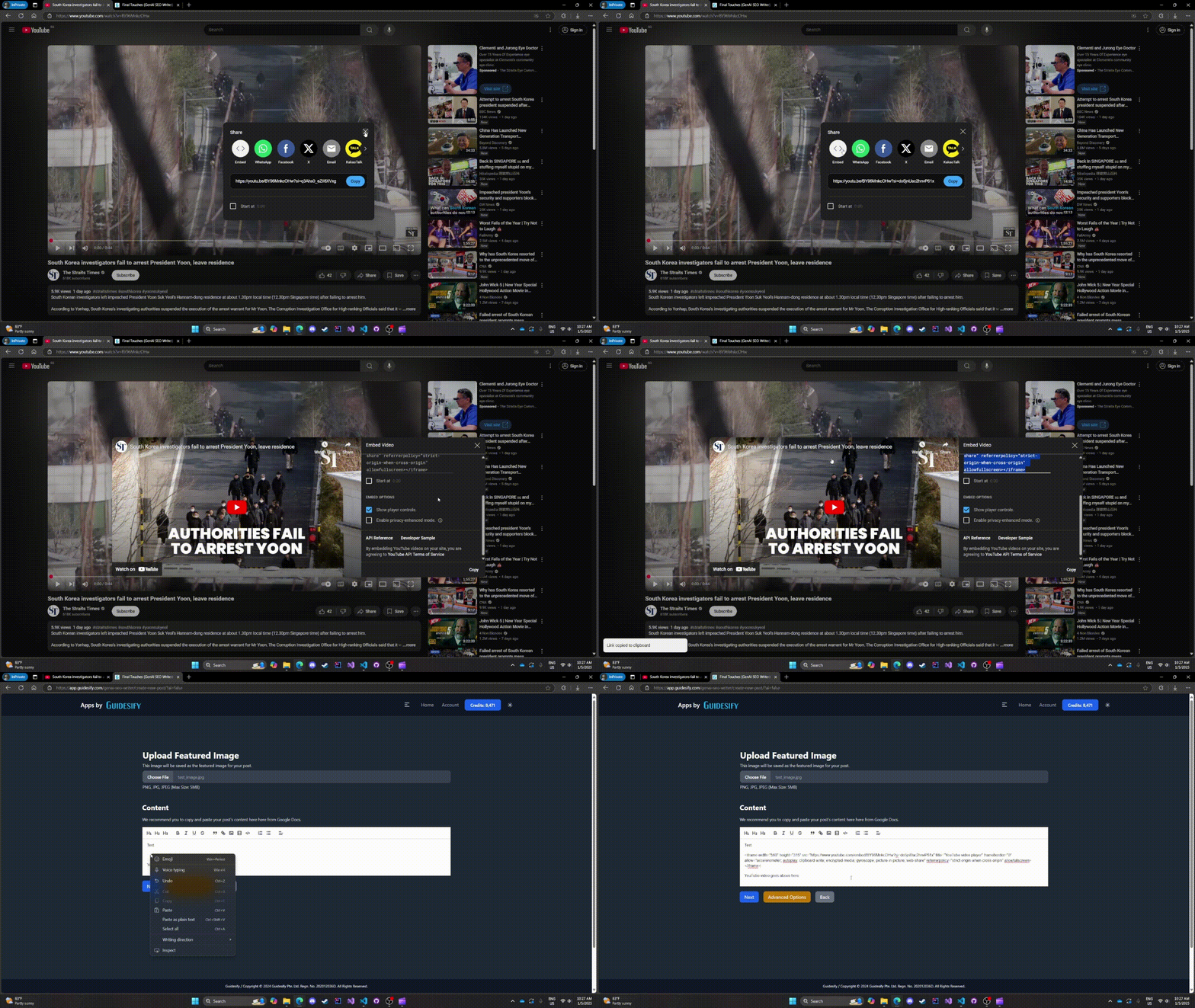
Steps: 1. Copy the YouTube embed HTML 2. Paste into the editor 3. Result: Properly embedded video in your post
TikTok Video Embedding
Similar process for TikTok videos:
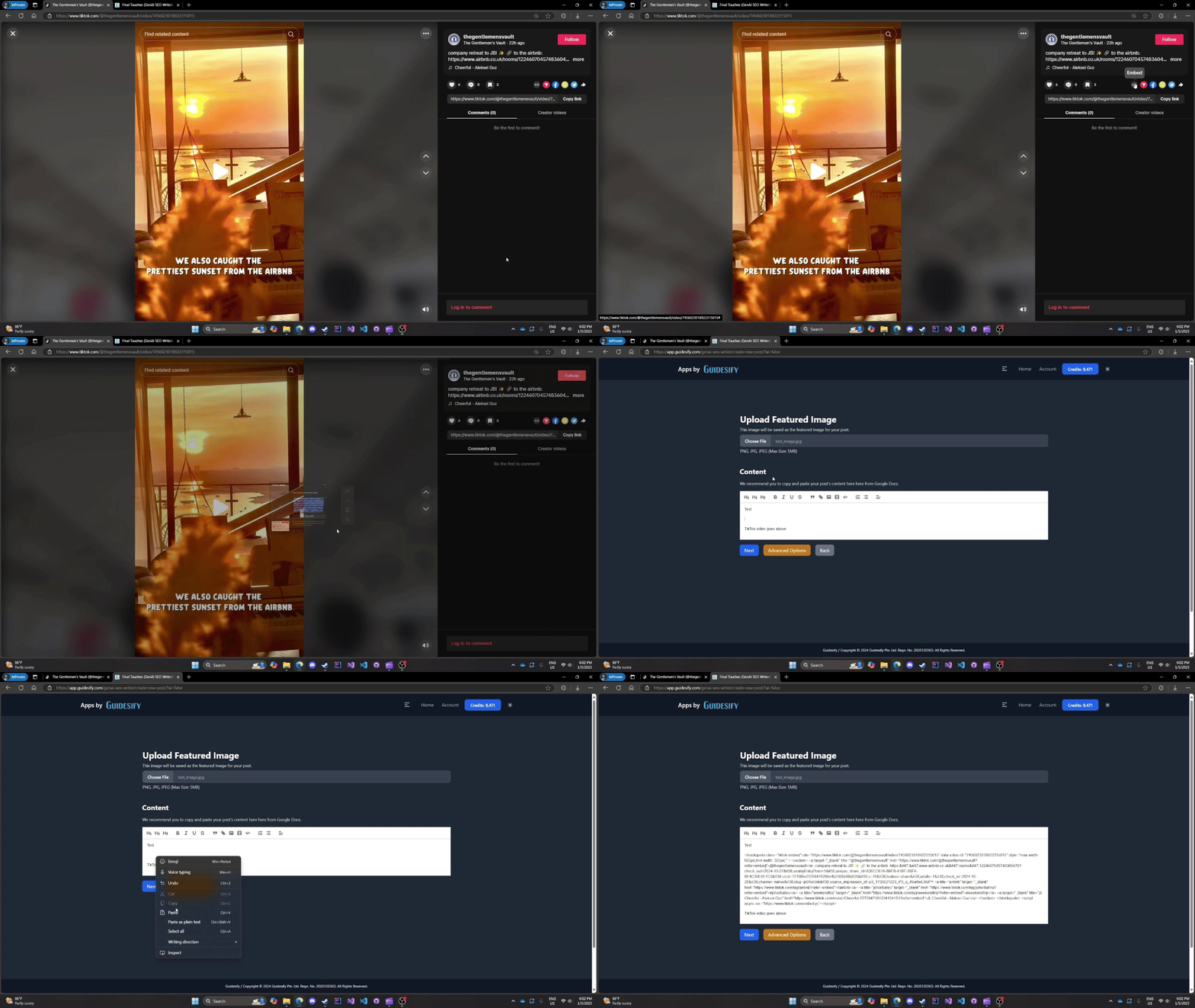
Process: Follow the same embedding workflow as YouTube
Step 4: Image Management (WordPress Only)
WordPress Exclusive
If you're not using WordPress, skip to Downloading Your Article.
Image Customization
Rename your images before publishing:
- Custom names for better SEO
- Automatic upload to WordPress media library
- Keep defaults if you prefer
Image Workflow: 1. Review all images in your article 2. Rename for SEO optimization (optional) 3. Proceed to publishing
Step 5: Telegram Integration (Optional)
Channel Notification
If you've connected a Telegram channel:
- Click "Post To Telegram" button
- Automatic subscriber notification
- Direct link to your new post
No Telegram?
Without Telegram integration, your article is published directly to your website!
Downloading Your Article (Non-WordPress Only)
Non-WordPress Sites Only
This feature is exclusively for non-WordPress websites. WordPress users have automatic publishing.
Download Process
For non-WordPress websites:
- Complete your article editing
- Click the "Download" button
- Receive a .docx version of your article
- Post manually to your preferred platform
Download Benefits: - Professional formatting preserved - Images included in document - Ready for manual publishing
Publishing Workflow Summary
| WordPress Sites | Non-WordPress Sites |
|---|---|
| 1️⃣ Select site | 1️⃣ Select site |
| 2️⃣ Choose title | 2️⃣ Choose title |
| 3️⃣ Edit content | 3️⃣ Edit content |
| 4️⃣ Rename images | 4️⃣ Download article |
| 5️⃣ Auto-publish | 5️⃣ Manual posting |
| 6️⃣ Telegram notify (optional) | - |
Ready to Create Amazing Content?
Start generating SEO-optimized articles that drive traffic and engagement.
Create Your First Post →